
Exo-CTO Guidebook

With all of the tech out there, plus AI in the mix ... everything at the push of button ...
Sometimes we ask ourselves, what are we getting?
Though I think a better question is, what do we need?
Especially in the world of 360-entrepreneurs, which is to say entrepreneurs who have to do it all, sales, customer service, marketing, inventory, etc ... and then AI is supposed to save us time; while the costs for AI are continuing to increase.
The following guide walks through all of the steps of the Exo-CTO bootcamp, starting with an overview of web-development and followed by introductions to Blender, GIMP and Audacity, as well as OBS; tools that do not require, nor utilize AI.
And so without any further adieu, vamo' puesh.
One-hundred years ago, if you didn't know how to use a hammer and nails; you couldn't add two plus two.
An exaggeration for sure, but you get the idea ... these days knowing the basics of web development (HTML, CSS, etc) ... knowing a little bit about video and image editing, is almost required for any entrepreneur.
Those with an understanding of audio editing, being one step ahead of the rest.
I can suffer poor video quality, but if I can't hear what's being said, or it hurts to listen ... what's the point of watching?
Security
We need to start here — both Windows and Apple just want your data; those are the facts.
Google, Facebook, etc moreso; so how do you protect yourself?
First off, I do recommend using Brave browser to browse the web.

Curiously enough Brave's default browser does seem to be implementing an AI overview of search results; there remains DuckDuckGo and Ecosia available.
Using Google Chrome, nor Safari, nor MS Edge (if that's still around) ... are not recommended. I'll forgo the details, but the day's of trusting close corporations has long-since passed, I'm sorry to say.
Next, I suggest using a password vault; though the choice is always the same, how much security are you willing to trade for convenience.
On the security end we have KeePassXC, an open-source cross platform application; the other end we have something like LastPass which is cross platform in a different way, and all passwords are kept on a collective corporate server.
A Brief History of Computing
One of the best resources for learning about the history of computers, is the history of the Unix machine! Classy name, right?
Computers started by reading punchcards; though eventually a language was developed to make their processes more automated. That language was C, or the seed that would grow into the C language. The system it was designed to build and maintain was call Unix.
A gentleman named Bill Gates soon started developing another system using the BASIC language; and this is how Microsoft as we know it, began.
It is important to note that C and Unix were originally created through the funding of Bell South Atlantic Labs and various US Universities researching computer engineering. Through a few coincidences, and convenient mishaps, C & Unix were made open-source; anyone could read the source code!
Early on, Microsoft differentiated itself from this trend, opting to be built on proprietary, or closed-source, code. And now open-source software is a growing norm, with open-source software available for most any application one might like to pursue. While the use of computers so common that a new problem has arisen.
What if one computer isn’t enough?
Enter Kubernetes, and distributed systems!
But this is a conversation for another book.
Low vs High Level Languages
High versus low level languages refers to the proximity to the assembly code.
What is the assembly code; it's the layer right above the 1’s & 0’s … the machine’s language.
We focus on some pretty high-level languages, Python (and bash, if you count it) are the lowest we will go in this book.
Though Harvard’s EdX course introduces one to C as well, for those interested.
A primary difference between languages levels is their operational efficiency.
Because the C language is closer to the assembly code, greater precision of action can be defined; creating more resource efficient processes.
For a higher-level language such as Python, many of the processes “under-the-hood” are already defined and can’t be easily adjusted. Interestingly enough, there are some efforts to improve this, see package Cython.
Command Line Interface
Also known as the terminal, or shell ... it is encouraged to have a background in this tool at least, before venturing further into how the internet was created, and how the underground tunnels and keys work 😼
To these ends, I wrote this up awhile ago:

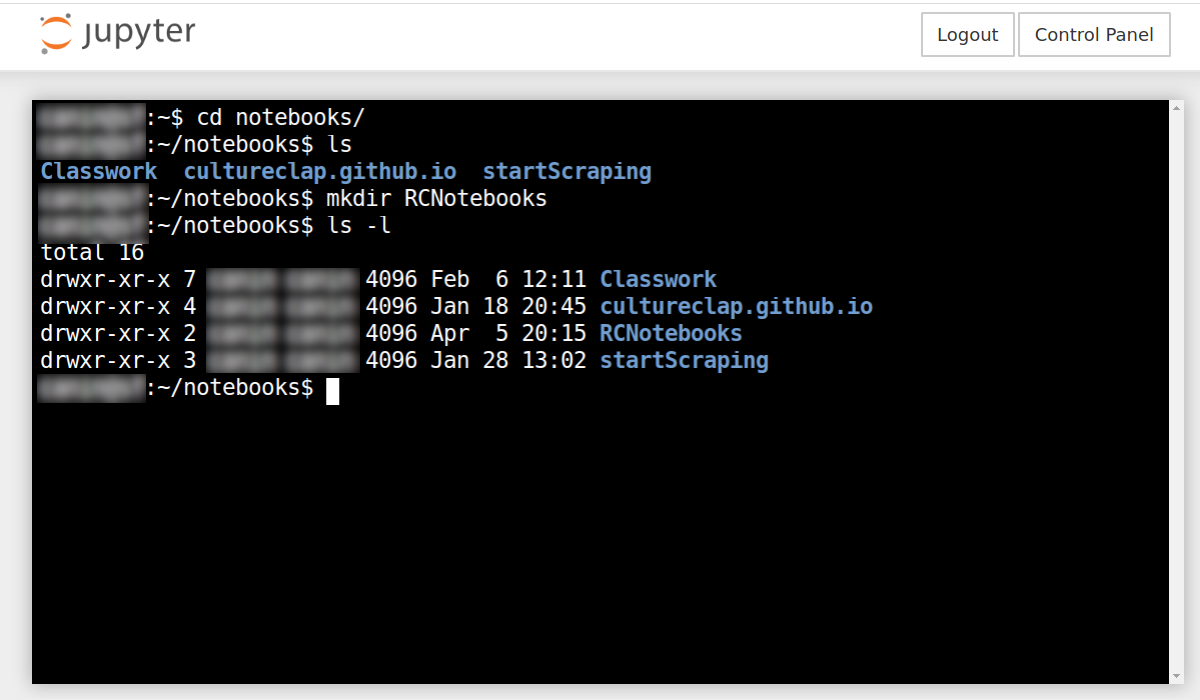
and it still serves as a solid base, and if you have an Apple computer, just look for the Terminal application in order to immediately apply the lessons from the guide.
Because if you work with multiple files often ... learning the terminal really is a god-send!
Domains and Hosting
Having your own domain on the internet is like having your own real estate; it's the address where people can find you, and you can communicate directly with your audience – and build whatever you wish.
All social media should be a funnel to your domain; which can intrinsically do a multitude of things, such as redirect mail addresses and contain sub-domains (store.example.com), for example.
Domains cost about $11 for a .com domain, a bit less for a .net domain, and about $8 for a .org domain, per year. Hosting on the other hand can cost as little as $4 per month for the most minimal droplet, though I recommend at least a $6 droplet sufficient to run a prototype application, and then some.
Though again, this is if you want to roll it all yourself, which is likely a dangerous proposition for the newly-informed; we are able to host your prototype on our servers for $10 per month.
If you are insistent on wanting to roll your own, I respect this, and am able to provide a 1:1 training and support program to these ends.
Web Sites vs Web Applications
What are we even "hosting" ... might be the question; and so we start with the difference between web-sites and web-applications.
Ok, hold-up ... a bit of code review to begin ...
At the core of any web entity, in some form or another, is an HTML template, with <html></html> tags, and more of the sort.
If we were to compare this to building a house, we could consider the HTML to be the framing; outlining the doors, walls, stairs and cabinets.
Next we've got the CSS, which is the aesthetic to the house. For the floors, carpet or wood? What colors are the walls and the counter tops? CSS answers these questions.
And this is a basic web-page ... it is static, it contains information that does not change; because were we to add something like JavaScript, now we have electricity and plumbing in our house, and it's gone from a web-page into a web-application; in all likelihood.
The Web Stack
The HTML part we were talking about is actually at the "top" of the stack, the most visible part of the stack – that's where the user-interface (UI) or Client resides.
Beneath the Client layer is the Server layer, and this is where data is made available to the Client Layer. And then beneath the Client layer we have the Database layer, where all of the information exists, often in tables containing rows and columns.
That is the core of the web-stack; there are other tools and layers that enable us to serve a web-application, and others that make the process more efficient, though that is not for this guide to cover.
Our key takeaways are, 1) it's less expensive to deploy a web-page than a web-application, 2) the database layer is just a spreadsheet, and 3) the server is where decisions get made.
4) The UI is where the user is provided options, and the interface is to respond accordingly, this is called the Client layer.
5) The Client makes requests of the Server.
6) The Server gets the requested data from the Database.
Various Applications
That is the breakdown of an incredibly basic web-application; using your domain you can have a variety of applications accessible by running each within a sub-domain.
Perhaps you want to use example.com as your homebase; and then create a sub-domain for your store at store.example.com, and then you also want a mobile-first Linktree-style web-page for your social media profiles at links.example.com?
Or perhaps you'd like to have a central application running to serve various content across your sub-domains; so you can more easily update the links for your personalized linktree, and update your blog from the same interface?
All of this being possible; as to whether it is all practical, that is for you to decide.
CMS - Content Management Systems
This is an evolving industry.
We reviewed with the basic web-application which is at the core of what a CMS is, though established, expanded and structured, so that others can develop additions, or plugins, to the application.
WordPress is an excellent example of a CMS, Drupal, Laravel and Djanjo are other examples; while all of these applications are run on servers similar to the web-applications we discussed earlier.
They are different from a Squarespace, Wix or the like ... which are all maintained on servers that you do not have direct access to; the company manages the hosting, servers and databases.
Substack
Substack is a mailing-list manager; there are also some executive issues with the organization – which I only say, so as to acknowledge.
The glaring issue with Substack is that you cannot export your subscribers – you don't have access to the actual mailing list, you can't leave the platform.
The "benefit" of Substack is that they cross promote projects within their domain; though apparently their are limits to this as well ... while other programs are creating open-source "federated" alternatives to this.
While you can find complaints no matter where you look, if you choose to look.
So take it as you will.
Beehiiv and Kit (formerly ConvertKit) are reputable alternatives to Substack, while Beehiiv has similiar sharing features as to Substack.
The Solution
I'm sorry there isn't one; no matter what you choose you'll have to compromise.
DreamFreely, this web-application, is an instance of Ghost blog; though I am having issues updating that are proving difficult to resolve – the compromise.
June 4th Update - I did get the issue fixed, wasn't difficult just more manual than the instructions suggested; overall relatively easy.
Regardless, I also have a web-application running in the background to gather and provide additional data.
WordPress can be an excellent decision for Five-Page (Home, About, Contact, Blog, Shop) web-sites that need to be moderately dynamic.
Though this is where it comes down to our first question:
What do you want?
And this will determine what you need.
Your Primary Product
- It needs to be external of your presence.
- It needs to be aligned with your lifestyle.
- It needs to be free.
Your first product cannot be 1:1 consultation because, what are you even talking about?
Your primary product answers that question; it provides a concise overview of what you're talking about, specifically opening up the opportunity for people to ask questions, beginning a conversation.
The job of your primary product is to serve as an excuse to start conversations.
When we say it needs to be external of you, we mean that it needs to be a tangible structure of actionable steps to accomplish a goal, that others can hold in their own hands.
You want A, well follow this structure and you'll get A, no problem!
Look at the structure, play with it, consider it, ask and learn why the structure works the way it does ... be able to explain why it works - that's a product.
What knowledge do you have that others might find useful?
How can it be structured to serve as a tool independent of your personal conversation?
There you will find your primary product.
The Editing Table
When building a digital presence, both images and video are important components that require considerable detail to produce. Though it is not impossible to produce these items yourself.
We'll cover three primary programs, GIMP, Blender and Audacity; and I'll likely create a video to cover the three topics, as that is just easier; though we'll briefly cover each here as well.
Graphic Image Manipulation Program
Open-source Adobe Photoshop; all of the same capabilities, maybe more – free and open-source. Requires to explain easily.
The Tool-Palette and the Layers Palette are the primary tool sets needed - for fun check out the Filters menu option to really spice up your images.
YouTube is fully of tutorials as well.
The layers palette is an idea we will need to consider for Blender as well ... if one layer is above another layer, it will cover all of the layers beneath it, where it is not transparent.
That's why you have your text above your background color/image ... me entiendes?
Blender Video Editing
Blender is primarily a 3D animation software, though it has a wonderful video editing suite as well.
You are able to do all of the cuts and fades other online-platforms allow, though with greater control over detail, and quantity. While you can easily build a template for repetitive content ... making content creation that much more efficient and malleable.
The basic keys are K, X, and I ... those are the only keys you need to remember.
K - to cut a strip at the bar.
X- to delete the selected strip.
I - to denote a key-frame and modify the associated parameter.
Again, I'll make a video to explain this a bit better, as well as where the Output and Strip properties can be found – we are necessary for key-frame utilization.
Audio Editing with Audacity
Sound quality makes a massive difference on platforms such as YouTube, and is just a good skill to have. Audacity is a free open-source application that provides all of the tools we need to improve your audio quality exponentially.
There are really only three tools.
EQ - Equalizer
Sound exists on a spectrum from 0 to 20,000, let's say ... but the super low and super high frequencies cause more distortion than clarity; so the EQ (equalizer) allows us to minimize or amplify certain frequencies.
Normally we'll want to drop 1k's, pick up our 3K and maybe 6K, pickup the 120's a bit as well; I need to explore a bit more about the mid-range (160 to 900). But those are the basics of EQ.
Compression
Sometimes there is an unnecessarily loud noise on a recording, where the audio "clips" even ... compression can help elevate this.
First we have the threshold, which determines how much of the sound the compressor will affect; and then we have the ratio ... I like a 1:6 ratio for vocals ... meaning that for ever 6db that the audio exceeds the threshold, 1db will actually be recorded, acting as a compressed presentation of those six other decibals.
You can also decide how quickly the compressor should "attack" and "release" the sound; I recommend at rapid attack at about 5-15ms, with a slightly longer release of about 20-25ms, maybe even 50ms.
Limiter
The Compressor will actually reduce the volume of your audio file; though you can add sufficient gain to counteract this.
Or you can just wait until you implement the limiter ... this is what takes your sound to a whole new level.
It's like a compressor, but much more smooth; and as you "increase" the threshold the louder your audio file will get without distorting the sound ... to a point, though you are able to decide that point.
And this is how you get clear and crisp audio for your video.
Reverb ...
Sometimes, especially with musical guests, but also with unaccompanied vocals, using a bit of reverb can be useful ... thought that's all I'll say about that because it isn't really necessary for vocals without music, and if used, should have a very light touch.
OBS
Open-Broadcasting Software is really the industry standard for screen-capture and live-streaming.
The big thing with OBS is the ability to use multiple cameras, as well as create compositions with multiple cameras and screen-shares; while allowing one to smoothly transition between these various scenes.
Though here again, a video will better server to explain.
That was a very brief overview of applications you can download and start using today to create your content.
Either way, the process of learning these tools will provide better insight as to what it takes to create the best media content possible; and this will enhance your ability to community with other media professionals with whom you might one day work.
So now let's talk about your product; we laid out some ground rules:
- It needs to be external of your presence.
- It needs to be aligned with your lifestyle.
- It needs to be free.
So how do we go about finding your primary product ... what is your primary product?
It's your lead magnet, it's what starts conversations; it's simple direct and accessible to your audience.
It's something that is slightly repetitive to produce, while the content is able to change based upon current or varied events.